A truck came back at the end of its lease and needed a price before it could be resold. Getting from inspecting a truck to price it took 30 to 60 days. The whole remarketing process, from acquisition to resale, ran about 180 days, including storage time. Those figures come from a project I worked on, not from published data. Seven business units were involved, plus the dealer, and every one of them did its job properly.
Nobody designed that delay. It built up one reasonable decision at a time, on top of tools each business unit trusted.
Manufacturers keep legacy systems because replacement takes one of two forms. Either the platform carries the existing process over as is, solving no business problem, keeping the complexity and adding nothing new, or it forces every unit to change its process at high cost. Either way the process is the real work and outlasts the platform.
This piece looks at two projects where a replacement platform was on the table, and what they show about why teams stay on legacy platforms. Replacement comes in two forms: a lift and shift that copies the existing process, or a common process that every unit has to adopt. Each meets resistance for a different reason, and in both the fix starts with the process and a business owner, not with the platform.
What Legacy Systems In Manufacturing Really Hold
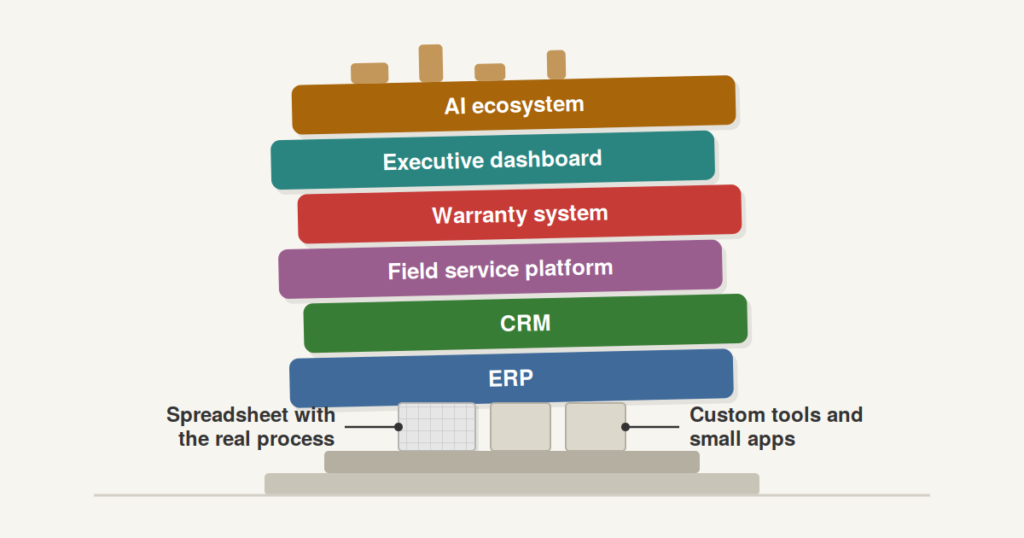
A legacy platform starts as a large piece of work. IT and the business put a lot of hours into building it, and the first version matched the process of the day. Then the company grew. A new region went live, a business unit joined, a new business model needed its own rules. Each was configured on top of what already existed, and each made sense on its own. Nobody stopped to look at the process end to end.
After a few years the platform holds more than software. It holds business rules, regional exceptions, data definitions and approval paths. A legacy system is technology and process together, and people depend on the process more than on the technology.
New tools get the same treatment. Organizations bend their process to fit a new platform as readily as they once bent it to fit the old one, and each additional tool adds another layer to untangle. Today’s replacement becomes tomorrow’s legacy system unless someone watches the process.
A legacy platform holds the business rules, regional exceptions and data definitions that accumulated as new units and business models were configured on top of it. Nobody reviewed the whole process along the way. Replacing the platform therefore means reopening every one of those decisions.
Two Cases Of Legacy System Replacement
Replacing a legacy platform stalls for reasons that look different from the outside. The two projects below show how. The first is a vehicle remarketing process at a large commercial vehicle OEM, where seven business units each ran their own tool and the business eventually accepted that a common platform was needed. The second is a process automation manufacturer whose business team already had a working spreadsheet and saw little reason to move.
One case is expensive to fix and the other has little to gain, and in both the missing piece is the process. The cases talk about two things: what the business would gain from a new platform, and what it would have to give up.
A Truck OEM’s Remarketing Process Across Seven Business Units
The first case was a large North American commercial vehicle OEM. Trucks came back at the end of their leases and were resold. The process ran from acquisition through costing and pricing to resale, and seven business units worked on it along with the dealer.
Each unit had a sound SOP and its own tool. Some ran on Excel, others on custom-built applications. Taken one at a time they worked. The trouble started wherever units had to agree on something shared: which parts were installed on a truck, what its bill of materials looked like, what the final price should be. Each of those needed validation from the other units, and no workflow linked the checks. The handoffs were manual at nearly every step, the same pattern that quietly drains margin between projects and service teams. From inspection to pricing took 30 to 60 days, and the full cycle about 180 including storage.
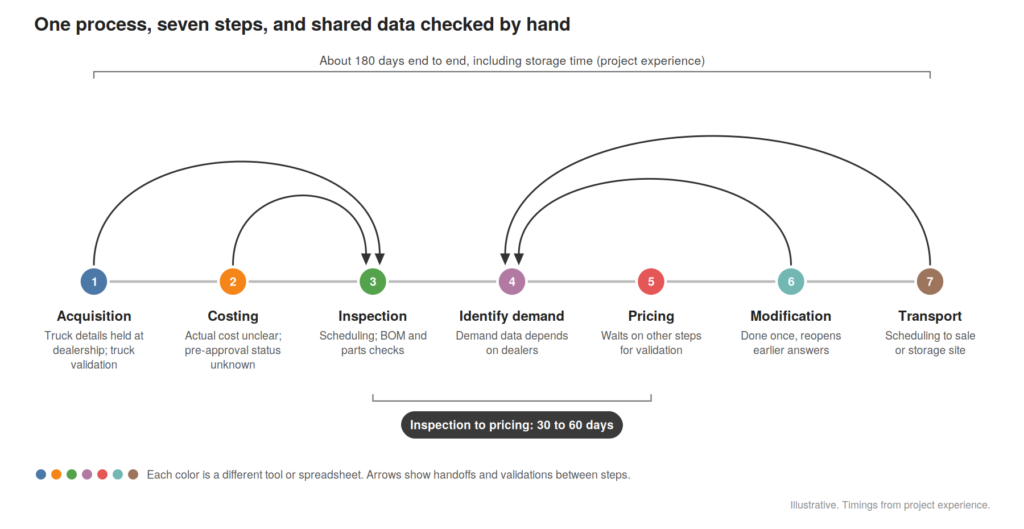
For a long time the units avoided a common platform. Each was comfortable with what it had, and from inside a single unit the process looked fine. That changed when an executive looked at the overall timeline and asked what the issue was. After holistic process review and discussions, the business agreed a common platform was needed as they were losing revenue, and the slow process hurt the customer experience. The benefit was clear. The hard part was agreeing one process across seven units, because every unit had to give something up.
How An Excel File Became An Asset Management Tool
The second case was a process automation manufacturer. Its common platform could no longer be configured for what the business needed, so the business built its own answer in Excel. The spreadsheet grew into a small asset management tool. It showed which customer had which product model, what was obsolete, and where service opportunities existed. A modern asset management tool does the same job with more capability, but this one worked and the team trusted it.
By the time IT offered a new platform, the business had a firm SOP and the spreadsheet built around it. Moving them took a lot of convincing, and their objection was fair. The platform would digitize the process they already followed and give executives more visibility. For the people doing the work it offered nothing new, and it would not remove any of the complexity they lived with. The cost of switching was modest. The benefit, as they saw it, was close to nothing.
| Truck OEM | Process Automation Manufacturer | |
|---|---|---|
| Form of replacement | Fit the process to a common platform | Lift and shift of the existing process |
| Where the process lived | Seven tools across seven units | One spreadsheet |
| Did the business want it? | Yes, agreed the need | No, saw little in it |
| What made it hard | Units had to agree one process | Nothing new for the people doing the work |
Why Do Businesses Resist Replacing A Legacy Platform?
Read side by side, the two cases show two forms of replacement.
The first is lift and shift. The new platform takes the existing process as it is. It is cheap to deliver and easy to explain, and it solves no business problem. The complexity and the number of processes stay where they were, and the business gets nothing it didn’t have. A polished vendor demo makes this form look better than it is, because a demo shows the tool and rarely the actual business process. When the process automation manufacturer’s team asked what was in it for them, there was no good answer.
The second is fitting the process to the platform. The benefit is real, because a common process removes handoffs and shortens the cycle. The cost is high, because every unit has to agree one way of working and someone gives something up. The truck units avoided it until the timeline forced the question, and the agreement still took more effort than the platform.
Resistance takes a different shape in each. With lift and shift it sounds like “what is in it for me?” With a common process it sounds like “why should my unit change?” Both are reasonable questions.
Ownership makes this worse. Mature organizations tend to start from business requirements and then choose a product that matches them, and many run a project management team as the front face between the business and IT. That works well for selecting a platform. It does not settle who owns the end-to-end process once the project is over. Projects close. New regions and business units get configured on top of the platform, and nobody reviews the whole. Some years later the new platform has become the legacy platform, for the same reason the old one did.
Businesses resist replacing a dated platform when it offers little new or asks too much of them. A lift and shift copies the existing process and solves no problem. A common process delivers value but makes every unit give something up. Without an owner for the end-to-end process, either route ends in the next legacy system.
A Starting Point: Process Before Platform
Digital transformation is a change in how work gets done, and a platform makes it possible. Starting with the platform gets the order backwards.
Fix the process before choosing the platform. Map the process end to end, find where units must agree, name one business owner, and write the case in outcomes the current workaround cannot deliver. Choose tooling last. A platform bought without these steps copies the existing process and keeps its complexity.
A workable sequence:
- Map the process end to end, including the spreadsheets and side tools that never reached an architecture diagram.
- Find the shared data points where units must agree, and measure how long validation takes today. In the truck project these were parts installed, bill of materials and final price.
- Define the future-state process and name one business owner who answers for it across units.
- Write the benefit case in process outcomes the current workaround cannot deliver, such as pricing time. Executive visibility alone will not move the people who do the work.
- Choose tooling last.
The truck assessment followed this order up to step 3: gaps and pain points first, then a future-state process, then the platform question. Skipping it is common, and programs that skip it tend to lose momentum around year two. If you want to test how ready your data and processes are before a platform decision, the AI Readiness Assessment covers those foundations across seven dimensions.
Three questions before approving a replacement
- Which business rules live only in this system, or in a spreadsheet beside it?
- Who on the business side can approve a change to each one?
- How long does the main cross-unit validation take today?
The Decision Before You Approve A Replacement
Before approving a replacement, ask whether the business case names a process outcome the existing system or spreadsheet cannot deliver, and whether a business owner is accountable for it. If the answer to either is no, the platform will digitize what exists and the complexity will stay. Fund the process work first.
The AI Readiness Assessment is free
It takes 10–12 minutes and gives you a scored view across all 7 dimensions, including your weakest link. No jargon. No sales call required.