

The OEM added the fields. Every technician has to complete them before closing a job. Form completion looks healthy on the dashboard, but the asset records are still wrong. That is a field service data quality problem, and it starts at the last mile.
Field data capture breaks down at OEMs when every department adds its own requirements to the service workflow, while technicians face limited site time and fragmented digital tools. Technicians then skip fields, capture detail outside the system or enter filler to pass validation. The result is a familiar paradox: completed service records, but unreliable field intelligence.
Most OEMs respond with more fields and more mandatory flags. That treats the form as the problem. Behind the form sits what I call the technician’s hidden job, and it plays out at the last mile: limited time on site, several departments asking for something, and most of the requests with no visible purpose.
This article follows what happens to a closure form at that point, what the OEM loses as a result, and why the usual fix makes it worse. It is not a software problem, and software is the last thing to change.
The Technician’s Hidden Job
The technician’s first job is to reach the customer site and fix the equipment with the parts, tools and knowledge available. This is a major task in itself. But as organizations need more field data, the job has grown to include feeding the OEM’s information systems with warranty, sales, engineering and asset data. This is the technician’s hidden job.
Each of these requests is reasonable, and each department can explain why it matters. The table below is illustrative and is not drawn from a single client.
| Function | What it asks the technician to capture | What it uses it for |
|---|---|---|
| Warranty | Failure code, replaced part, images, labor hours | Claim adjudication |
| Sales | Customer needs, upgrade or contract opportunity | Lead follow-up |
| Asset management | Serial number, configuration, location | Installed base record |
| Engineering and quality | What failed and why | Product feedback |
| Service operations | Arrival, completion and status | KPIs and reporting |
Nobody adds these up. Each department sees its own field and its own data quality problem. The technician sees one long form at the end of a job.
The form also changes whenever the OEM adds a system. A new CRM, a warranty platform or an FSM rollout each arrives with its own mandate to capture something on site, and the earlier mandates tend to stay. The technician’s screen is where those platform layers pile up.
Why Field Intelligence Gets Lost At The Point Of Service
Field intelligence gets lost at the point of service when the tool is slow or disconnected, site time is short, the same information is entered more than once, and nobody explains what the data is for. Under those conditions, accurate entry costs the technician time and returns nothing they can see, so they enter the minimum.
Site time is the first constraint. At an HVAC manufacturer, technicians had to wait on site for the customer to receive a quote that was prepared in the office. That wait came out of the same visit in which everything else had to get done, including the closure form.
The tool is the second. A process measurement organization wanted technicians to capture asset data at every visit. Its FSM tool had no offline capability and could not store the data, so technicians could not have entered it even if they had wanted to. The organization held the new fields until a custom tool was ready. That restraint is worth noting, because a field added to a tool that cannot carry it gets skipped, or filled with whatever clears the validation. Offline capability is one of the gaps that decides whether a tool can carry the ask.
Purpose is the third. At the same organization, technicians asked why the company needed asset details when they already knew which assets were installed at each customer site. From their side it is a fair question. They were being asked to re-enter something they knew and could not see being used.
How Technicians Adapt To The Workflow
Technicians adapt to an overloaded workflow in three ways. Their records come back incomplete, they capture detail outside the system, or they make entries mainly to satisfy validation. Mandatory fields get filled, but a mandatory field proves only that something was typed. It says nothing about whether the entry is accurate or useful. These are patterns from practice. They are a hypothesis about cause, and no single form produces all three at once.
The OEM cannot make every field mandatory, because every mandatory field adds time to every visit. So the form splits into fields that must be filled and fields that are requested, and the requested ones tend to go blank. Some technicians keep the detail the form has no place for outside the system, so the useful part of the visit never reaches the record.
The third behavior is the one OEMs least like to discuss. On automotive warranty claim forms, technicians often attach the same text and the same images to claim after claim to clear validation. An audit can classify that as non-compliance or fraud, and falsified evidence is a real problem that OEMs are right to police. It is also worth looking at the requirement from the technician’s side. For an obvious failure, why does the OEM need a photo? For an electrical fault, what could a photo show? When a requirement has no visible diagnostic purpose, meeting it becomes a formality, and people learn to meet it as cheaply as possible.
| Behavior | What it looks like on the form | What the dashboard shows |
|---|---|---|
| Incomplete records | Blank asset, history and note fields | Acceptable completion, because mandatory fields are filled |
| Information captured outside the system | Key detail kept off the system | Closed jobs that look normal |
| Entries made to satisfy validation | Repeated text, repeated images, default values | Complete forms and claims that pass |
What Poor Field Service Data Quality Costs The OEM
Poor field service data quality leaks business value in three main places: asset and knowledge records decay, service execution slows, and revenue is lost. The cost rarely traces back to the workflow. It shows up later in other departments’ reports, which is why nobody connects it to the technician’s screen.
Three losses come first, and each lands in a different department’s reporting, which is why they look like three separate problems. The installed base team sees stale asset records. Service operations sees repeat visits and weak first-time fix. Finance sees claims, invoices and quotes that leak money. All three trace back to the same closure form.
- Data and Knowledge. Asset records go a little more stale with every visit, because the technician is often the only person who sees the equipment change. Stale records are usually blamed on installed base governance, but much of the problem starts earlier, at capture. Repair history and field knowledge decay the same way, and AI readiness depends on this layer: any AI initiative built on it inherits the quality of what technicians entered.
- Service Execution. The next technician arrives with less information than the job needs, so the first visit becomes diagnosis, the second brings the right part, and more cases escalate. First-time fix is only as reliable as the closure data behind it, because a weak record shows that a visit failed and not why. At a material handling customer, the work focused on putting service documents in front of the technician at the point of service to improve first-time fix.
- Financial Leakage. Weak closure data costs money in several budgets at once: claims that cannot be properly checked, invoices waiting for work notes, and capacity lost to rework and waiting. Quoting shows it most clearly. At an HVAC manufacturer, managers prepared quotes in the office while technicians waited on site, and letting technicians quote on the spot made the process real time and improved service revenue. Warranty carries the same risk, since evidence met with filler leaves the OEM paying claims it cannot properly adjudicate.
Added up, these losses are the price the OEM pays for leaving the hidden job unmanaged. The usual fix makes that bill larger.
Why The Standard Fix Backfires
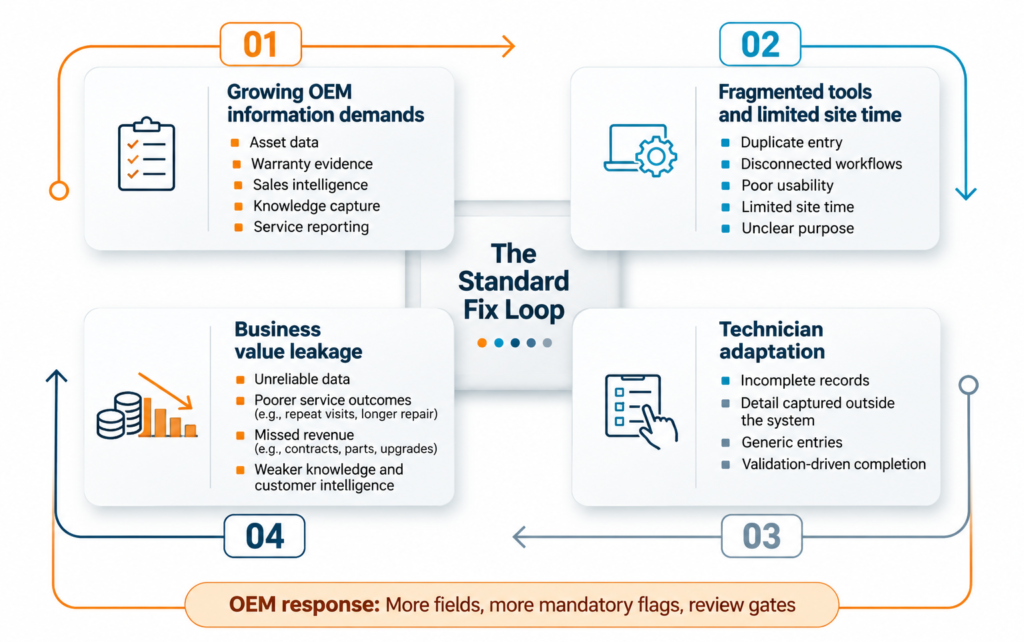
The standard response to bad field data is to add fields, mark more of them mandatory, and put a review gate before closure. Each step raises the cost of every visit and teaches technicians what clears the gate. Completeness improves on the dashboard while accuracy stays where it was, so the OEM adds more fields.
The pattern is a loop. Growing demands meet fragmented tools and limited time. Technicians adapt. Value leaks, and the leak prompts the next field, which feeds the demands again.
The KPI makes it worse. Closure form completion rate is easy to measure and easy to satisfy, and filler satisfies it as well as truth does. Once completion becomes the target, it stops telling you anything about accuracy.
Platforms are useful here. Data quality has three parts: completeness, accuracy and usability. Validation rules, mandatory fields and review gates improve completeness. Accuracy and usability are the larger part of the problem. The order matters. First decide what each field is for and who owns it. Then design the capture so it fits the visit. Software comes after that, when you check that the tool can carry the ask on site, offline included.
Designing Field Intelligence Into The Service Workflow
The central message of this article is that you cannot turn technicians into a reliable source of field intelligence by adding field data capture duties to their workload. The service workflow has to be designed so that accurate capture is a natural part of the job.
Decide Who May Add A Field
Every new field should be approved by the people who will fill it in. When a department asks for one, a working technician joins the conversation, along with the service manager or product owner who answers for the technician’s workload. The request needs a named user, the decision the data feeds, and an honest estimate of the seconds it adds to every visit. A field nobody can justify stays off the form. Someone also has to own the total length of the form, because without an owner each department keeps adding.
Remove What The System Already Knows
Sort the existing fields into three groups: data the OEM already holds, data the system can derive, and data only the technician can supply. Asset configuration, contract terms and previous visit history often exist in another system already, so those fields should not be asked at all. Where the OEM holds the data, pre-fill it and ask the technician to confirm or correct it.
| Kind of field | Illustrative Examples | What to do | What the technician does |
|---|---|---|---|
| Already held by the OEM | Asset configuration, contract terms, last visit | Pre-fill from the source system | Confirms or corrects |
| Derivable | Entitlement status from serial number and contract | Derive in the background | Nothing |
| Known only to the technician | What failed, what fixed it, asset details nobody holds | Ask, in the simplest form available | Enters or selects |
Confirming takes seconds, and the technician is the one person on site who can tell when the record is wrong. In a proof of concept for billing and invoicing, the system pre-filled the invoice from warranty and contract data and the technician’s work notes, and the technician reviewed it with the customer on site. Customers received it well. Validation only works when it is real. If the technician taps confirm without reading, the OEM has built a new way past the form, so the check needs a reason: someone present who will notice, or a value the technician cares about, and an easy way to correct it.
Capture The Remainder The Simple Way
Some data only the technician can supply, such as asset details nobody holds. The measurement organization held its asset fields until a custom tool could capture them offline. Dropdowns, defaults carried over from the previous visit and photo capture all lower the cost of what remains. Image reading, where the system extracts asset details from a photo, is an emerging option. It could replace typing, but it is not yet a proven fix. Poor lighting and wear can limit accuracy, it needs a tool that works offline, and the technician should still confirm what was read.
Then change what you measure. Completion rate rewards filler. A better signal is how often technicians correct pre-filled values. A correction rate near zero is ambiguous, because either the pre-fill is accurate or nobody is reading, so sample it.
One test sits behind all of this: does the data get used during the visit? A quote and an invoice do, with the customer present, so the technician has every reason to get them right. Asset data pays back later and elsewhere, so it has to cost close to nothing to capture.
Questions To Ask Before Adding The Next Field
Most of the fixes in this article are decisions made before a field reaches the form. Five questions make that decision concrete.
- Who will use this field, and for which decision?
- Does the technician ever see it used?
- Could the system fill it from data the OEM already holds?
- Can the tool capture it on site without a connection?
- Who owns the total length of the form?
A field is a small request, which is why it is so easy to add. Each one costs a technician a few seconds on every visit, and the OEM pays for the total in places that never point back to the form. Field service data quality improves when the first question about any new field is what the technician gets in return, and when someone owns the answer. Without that, the hidden job keeps growing and the records keep looking complete.
Weak closure data shows up first in warranty claims, where thin or repeated evidence leaves the OEM rejecting good claims or paying weak ones.
Where is your warranty data leaking?
The free 15-question Warranty Leakage Self-Audit takes about seven minutes and shows where your warranty program is leaking and what to fix first.